User Guide
InternLink is a desktop app for managing contacts, optimized for use via a Command Line Interface (CLI) while still having the benefits of a Graphical User Interface (GUI). If you can type fast, InternLink can get your contact management tasks done faster than traditional GUI apps.
Table of Contents:
- Quick start
-
Features
- Viewing help: (help)
- Adding a person (add)
- Deleting a person (delete)
- Editing a person (
edit) - Listing all persons (
list) - Locating contacts globally (global
find) - Locating contacts by specific fields (field
find) - Adding tags to one or more people (
addtag) - Deleting tags from one or more people (
deletetag) - Editing existing tags (
edittag) - Filtering contacts by tags (
filtertag) - Starring a person (
star) - Unstarring a person (
unstar) - Adding a meeting (
addmeeting) - Deleting a meeting (
deletemeeting) - Clearing all entries (
clear) - Exiting the program (
exit) - Saving the data
- Editing the data file
- FAQ
- Known issues
-
Command summary
Quick start
-
Ensure you have Java
17or above installed in your Computer.
Mac users: Ensure you have the precise JDK version prescribed here. -
Download the latest
.jarfile from here. -
Copy the file to the folder you want to use as the home folder for your AddressBook.
-
Open a command terminal,
cdinto the folder you put the jar file in, and use thejava -jar addressbook.jarcommand to run the application.
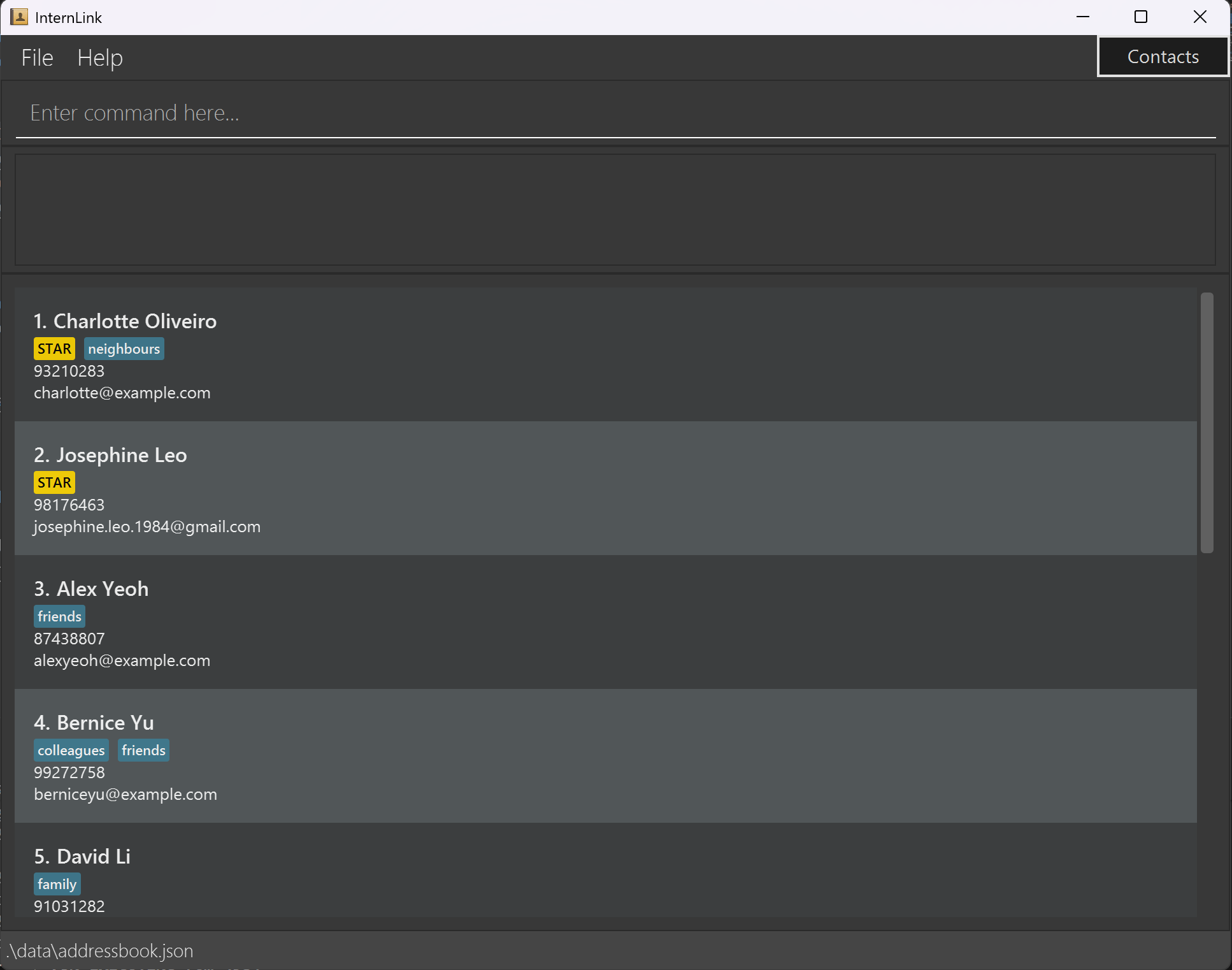
A GUI similar to the below should appear in a few seconds. Note how the app contains some sample data.
-
Type the command in the command box and press Enter to execute it. e.g. typing
helpand pressing Enter will open the help window.
Some example commands you can try:-
list: Lists all contacts. -
add n/John Doe p/98765432 e/johnd@example.com: Adds a contact named John Doe to the Address Book, with phone number98765432and emailjohnd@example.com. -
delete 3: Deletes the 3rd contact shown in the current list. -
clear: Deletes all contacts. -
exit: Exits the app.
-
-
Refer to the Features below for details of each command.
Features
 Notes about the command format:
-
Words in
UPPER_CASEare the parameters to be supplied by the user.
e.g. inadd n/NAME,NAMEis a parameter which can be used asadd n/John Doe. -
Items in square brackets are optional.
e.gn/NAME [t/TAG]can be used asn/John Doe t/friendor asn/John Doe. -
Items with
… after them can be used multiple times including zero times.
e.g.[t/TAG]…can be used ast/friend,t/friend t/familyetc. -
Parameters can be in any order.
e.g. if the command specifiesn/NAME p/PHONE_NUMBER,p/PHONE_NUMBER n/NAMEis also acceptable. -
Extraneous parameters for commands that do not take in parameters (such as
help,list,exitandclear) will be ignored.
e.g. if the command specifieshelp 123, it will be interpreted ashelp. -
If you are using a PDF version of this document, be careful when copying and pasting commands that span multiple lines as space characters surrounding line-breaks may be omitted when copied over to the application.
Viewing help : help
Shows a message explaining how to access the help page.

Format: help
Adding a person: add
Adds a new person to the address book.
Requirements:
A person must have a NAME and at least one of the following:
PHONE_NUMBEREMAIL
Format: add n/NAME [p/PHONE_NUMBER] [e/EMAIL] [t/TAG]...
💡 Tip: A person can have zero or more tags.
Examples:
add n/John Doe e/johnd@example.comadd n/Betsy Crowe p/1234567 e/betsycrowe@example.com t/friend t/criminal
Deleting a person : delete
Deletes the specified person from the address book.
Format: delete INDEX
- Deletes the person at the specified
INDEX. - The index refers to the index number shown in the displayed person list.
- The index must be a positive integer 1, 2, 3, …
Examples:
-
listfollowed bydelete 2deletes the 2nd person in the address book. -
find Betsyfollowed bydelete 1deletes the 1st person in the results of thefindcommand.
Editing a person : edit
Edits an existing person in the address book.
Format: edit INDEX [n/NAME] [p/PHONE] [e/EMAIL] [t/TAG]…
- Edits the person at the specified
INDEX. The index refers to the index number shown in the displayed person list. The index must be a positive integer 1, 2, 3, … - At least one of the optional fields must be provided.
- Existing values will be updated to the input values.
- When editing tags, the existing tags of the person will be removed i.e adding of tags is not cumulative.
- You can remove all the person’s tags by typing
t/without specifying any tags after it.
Examples:
-
edit 1 p/91234567 e/johndoe@example.comEdits the phone number and email of the 1st person to be91234567andjohndoe@example.comrespectively. -
edit 2 n/Betsy Crower t/Edits the name of the 2nd person to beBetsy Crowerand clears all existing tags.
Listing all persons : list
Shows a list of all persons in the address book.
Format: list
Locating persons globally: global find
Global find can take in multiple parameters and will output all contacts that has any of the fields that fit the parameters
Format: find <SEARCH SUBSTRING> [<OTHER SEARCH SUBSTRINGS>]...
- The search is case-insensitive. e.g
hanswill matchHans - The order of the keywords does not matter. e.g.
Hans Bowill matchBo Hans - Persons matching at least one keyword will be returned (i.e.
ORsearch). e.g.Hans Bowill returnHans Gruber,Bo Yang
Examples:
-
find JohnreturnsjohnandJohn Doein all fields except tags (name, email, phone) -
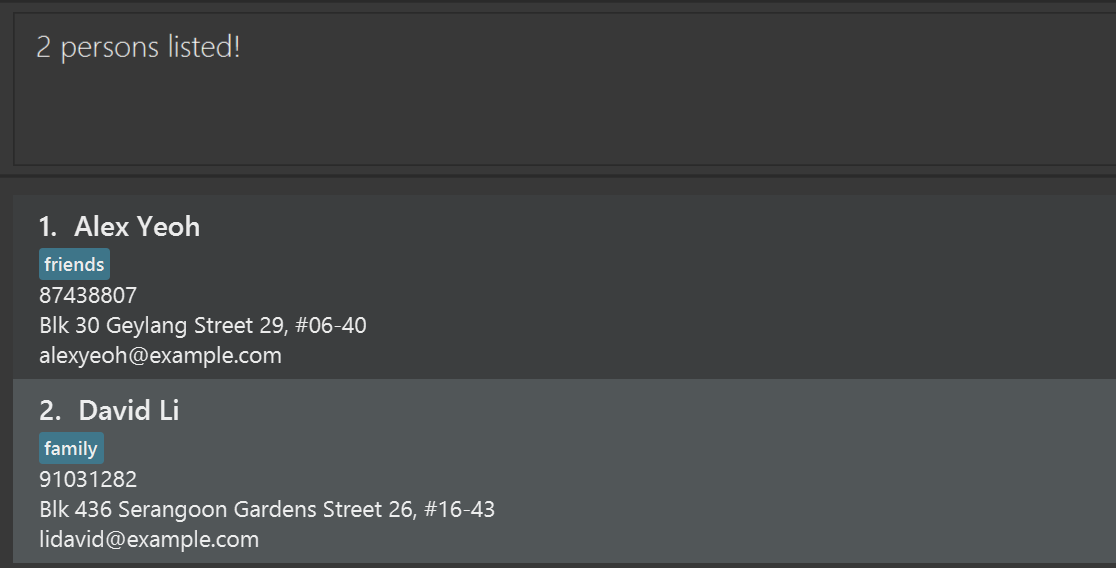
find alex davidreturnsAlex Yeoh,David Li
Locating persons by specific fields: field find
Field find can take in multiple parameters of the same type and only search within that field. BUT, field find cannot be used with global find concurrently.
Format: find [n/NAME] [p/PHONE] [e/EMAIL]...
Example: find n/ david p/ 9927 e/ charlotte
The above example will filter all contacts whose name contains david OR whose phone number contains 9927 OR whose email contains charlotte.
Adding tags to one or more people : addtag
Add one or more tags to one or more people in the address book
Format: addtag INDEX, [INDICES...] / TAG [/ TAG]
- Adds the specified
TAG(s) to the specifiedINDEX(s). - The indices refers to the index numbers shown in the displayed person list (1-indexed).
- The indices must all be positive integers (1, 2, 3, …), and be referring to a valid index in the address book.
- All indices must be separated from each other by a comma.
Examples:
-
addtag 5 / classmatesadds theclassmatestag to contact index 5. -
addtag 1, 2, 3 / friends / csadds thefriendsandcstags to contact indices 1, 2 and 3.
Deleting tags from one or more people : deletetag
Deletes one or more tags from one or more people in the address book
Format: deletetag INDEX, [INDICES...] / TAG [/ TAG]
- Deletes the specified
TAG(s) from the specifiedINDEX(s). - The indices refers to the index numbers shown in the displayed person list (1-indexed).
- The indices must all be positive integers (1, 2, 3, …), and be referring to a valid index in the address book.
- All indices must be separated from each other by a comma.
- At least one of the
TAGs must be already tagged on one of the specified contacts, otherwise the command will fail.
Examples:
-
deletetag 5 / classmatesdeletes theclassmatestag from contact index 5. -
deletetag 1, 2, 3 / friends / csdeletes thefriendsandcstags from contact indices 1, 2 and 3.
Editing existing tags : edittag
Rename existing tags across multiple contacts in batch
Format: edittag [INDICES OR 'all'] o/ OLDTAG n/ NEWTAG
- Using the
allkeyword instead of specific indices will do a global edit of the givenOLDTAG, while inputting specific indices only edits them for the given contacts. - As long as one of the specified contacts has the given
OLDTAG, the command will be valid. -
edittagoperates on the current list, not the whole address book. - Indices are to be separated by commas.
Examples:
-
edittag 1, 2, 3 o/ cs n/ computer scienceedits the tagcsfor contacts 1, 2 and 3, and changes it tocomputer science. -
edittag all o/ cs n/ computer scienceedits the tagcsfor all contacts in the current list, and changes it tocomputer science.
Filtering contacts by tags : filtertag
Display only contacts with specific tags for easier management
Format: filtertag / TAG [/ TAG]...
-
filtertagoperates on the entire address book rather than the current filtered list. - All contacts containing at least one of the given tags will be filtered.
Examples:
-
filtertag / classmateswill filter all contacts that contain theclassmatestag. -
filtertag / schoolB / schoolCwill filter all contacts that contain at least one of theschoolBorschoolCtags.
Starring a person : star
Stars / Favourites a person in the address book
Format: star INDEX
- Stars the person at the specified
INDEX. - The index refers to the index number shown in the displayed person list.
- The index must be a positive integer 1, 2, 3, …
- This command is functionally the same as
addtag INDEX, [INDICES...] / STAR, where addtag can star more people simultaneously
Examples:
-
listfollowed bystar 2stars the 2nd person in the address book. -
find Betsyfollowed bystar 1stars the 1st person in the results of thefindcommand.
Unstarring a person : unstar
Unstars / Unfavourites a person in the address book
Format: unstar INDEX
- Unstars the person at the specified
INDEX. - The index refers to the index number shown in the displayed person list.
- The index must be a positive integer 1, 2, 3, …
- This command is functionally the same as
deletetag INDEX, [INDICES...] / STAR, where deletetag can unstar more people simultaneously
Examples:
-
listfollowed byunstar 2unstars the 2nd person in the address book. -
find Betsyfollowed byunstar 1unstars the 1st person in the results of thefindcommand.
Adding a meeting : addmeeting
Add meetings to one or multiple contacts at once
Format: addmeeting INDICES d/DESCRIPTION dt/DATE
- Dates must be in the YYYY-MM-DD format.
Example: addmeeting 1, 2 d/ Casual icebreaker dt/ 2026-03-26
Deleting a meeting : deletemeeting
Remove meetings using indices
Format: deletemeeting INDICES
- Regarding index order: Meetings are sorted by date by default to give chronological overview.
Example: deletemeeting 1
Clearing all entries : clear
Clears all entries from the address book.
Format: clear
Exiting the program : exit
Exits the program.
Format: exit
Saving the data
AddressBook data are saved in the hard disk automatically after any command that changes the data. There is no need to save manually.
Editing the data file
AddressBook data are saved automatically as a JSON file [JAR file location]/data/addressbook.json. Advanced users are welcome to update data directly by editing that data file.
 Caution:
If your changes to the data file makes its format invalid, AddressBook will discard all data and start with an empty data file at the next run. Hence, it is recommended to take a backup of the file before editing it.
Caution:
If your changes to the data file makes its format invalid, AddressBook will discard all data and start with an empty data file at the next run. Hence, it is recommended to take a backup of the file before editing it.Furthermore, certain edits can cause the AddressBook to behave in unexpected ways (e.g., if a value entered is outside of the acceptable range). Therefore, edit the data file only if you are confident that you can update it correctly.
FAQ
Q: How do I transfer my data to another Computer?
A: Install the app in the other computer and overwrite the empty data file it creates with the file that contains the data of your previous AddressBook home folder.
Known issues
-
When using multiple screens, if you move the application to a secondary screen, and later switch to using only the primary screen, the GUI will open off-screen. The remedy is to delete the
preferences.jsonfile created by the application before running the application again. -
If you minimize the Help Window and then run the
helpcommand (or use theHelpmenu, or the keyboard shortcutF1) again, the original Help Window will remain minimized, and no new Help Window will appear. The remedy is to manually restore the minimized Help Window.
Command summary
| Action | Format, Examples |
|---|---|
| Help | help |
| Add |
add n/NAME [p/PHONE_NUMBER] [e/EMAIL] [t/TAG]… e.g., add n/James Ho p/22224444 e/jamesho@example.com t/friend t/colleague
|
| Delete |
delete INDEXe.g., delete 3
|
| Edit |
edit INDEX [n/NAME] [p/PHONE_NUMBER] [e/EMAIL] [t/TAG]…e.g., edit 2 n/James Lee e/jameslee@example.com
|
| List | list |
| Global Find |
find <SEARCH SUBSTRING> [<OTHER SEARCH SUBSTRINGS>]...e.g., find alex david
|
| Field Find |
find [n/NAME] [p/PHONE] [e/EMAIL]...e.g., find n/ david p/ 9927 e/ charlotte
|
| Add tags |
addtag INDEX, [INDICES...] / TAG [/ TAG]e.g., addtag 1, 2 / friends / cs
|
| Delete tags |
deletetag INDEX, [INDICES...] / TAG [/ TAG]e.g., deletetag 1, 2 / friends / cs
|
| Edit tags |
edittag [INDICES OR 'all'] o/ OLDTAG n/ NEWTAGe.g., edittag 1, 2, 3 o/ cs n/ computer science
|
| Filter tags |
filtertag / TAG [/ TAG]...e.g., filtertag / schoolB / schoolC
|
| Star |
star INDEXe.g., star 2
|
| Unstar |
unstar INDEXe.g., unstar 2
|
| Add meetings |
addmeeting INDICES d/DESCRIPTION dt/DATEe.g., addmeeting 1, 2 d/ Casual icebreaker dt/ 2026-03-26
|
| Delete meetings |
deletemeeting INDICESe.g., deletemeeting 1
|
| Clear | clear |
| Exit | exit |